By Patricia A. Pramono • Studio 1080, Published on October 08, 2025
TABLE OF CONTENTS
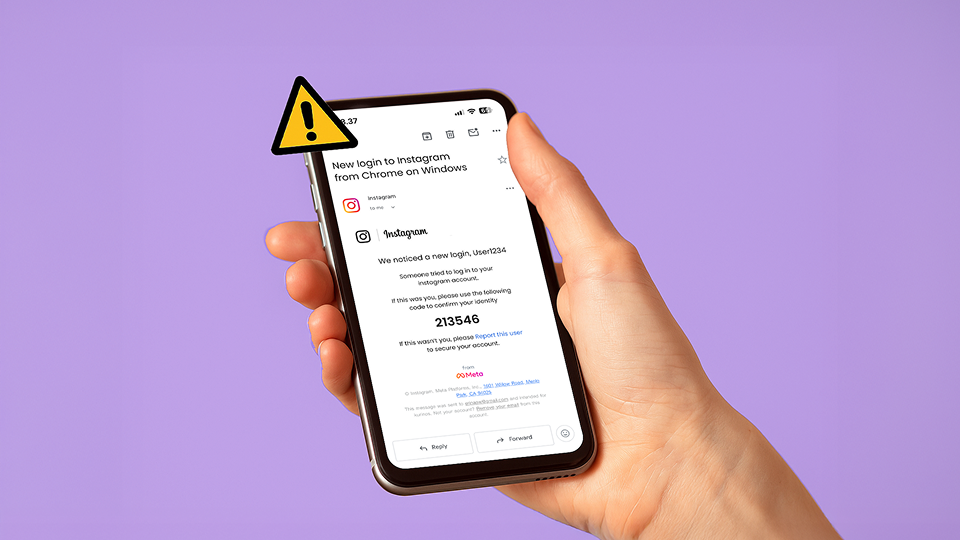
Have you ever received an email from Instagram saying someone tried to log into your account? At first glance, it looks legitimate. Complete with the familiar branding, a six-digit code, and a prompt to secure your account. The message creates a sense of urgency, making you feel that immediate action is necessary.
But here’s the real concern: it could all be a scam, without a single suspicious link to click.
A new wave of phishing campaigns is targeting Instagram users with messages that look strikingly authentic, but operate in ways that many people are not yet familiar with. Unlike older scams, these attacks don’t rely on clumsy typo, misspellings or obvious malicious links. Instead, they exploit trust and urgency in subtle ways, enough to catch individuals and even businesses off guard.
For companies that depend on Instagram as a key communication and sales channel, the risks go far beyond a compromised account. The consequences can include reputational harm, loss of customer trust, and even financial damage.
How the Scam Works
Traditional phishing emails often try to lure victims onto scam websites designed to capture usernames and passwords. It’s a tactic many people are now more cautious about, since security awareness campaigns have long emphasized the risk of clicking on suspicious links.
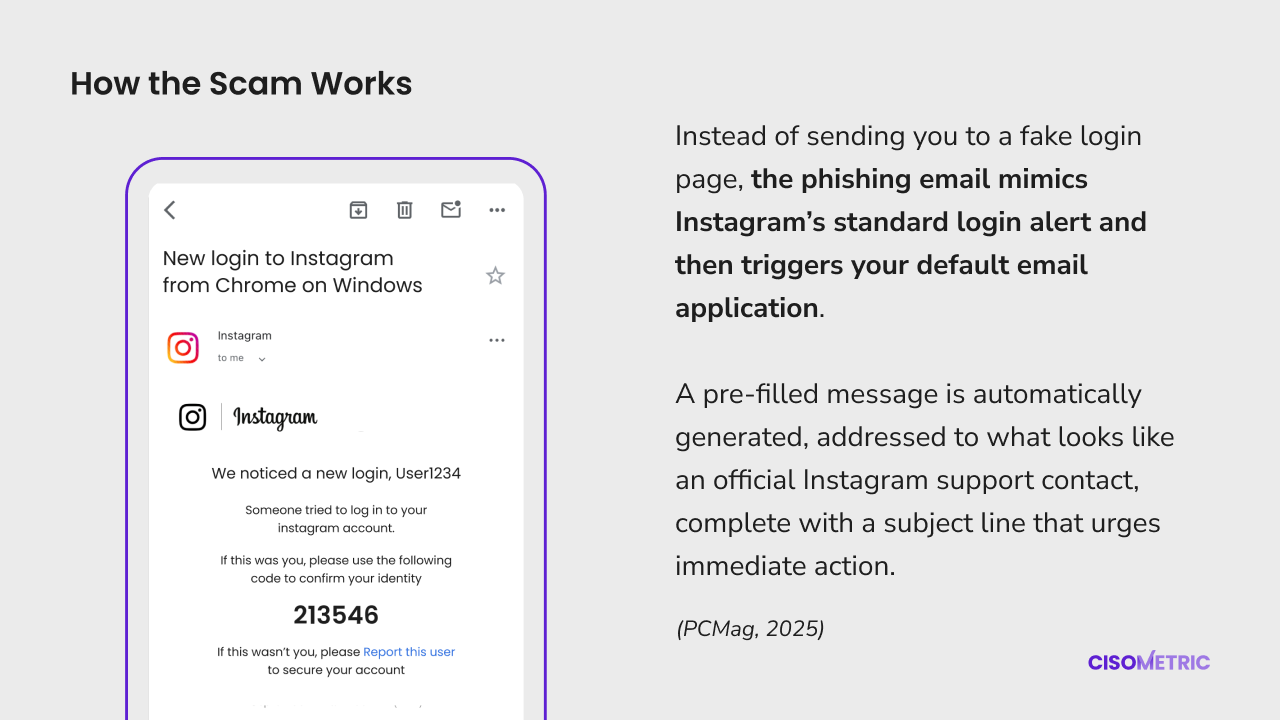
This new campaign, however, takes a different approach. Instead of sending you to a fake login page, the phishing email mimics Instagram’s standard login alert and then triggers your default email application. A pre-filled message is automatically generated, addressed to what looks like an official Instagram support contact, complete with a subject line that urges immediate action (PCMag, 2025).
The prompts are carefully worded to play on a user’s sense of responsibility:
- “Report this user to secure your account”
- “Remove your email address from this account”
At first glance, replying might even feel safer than clicking on an unknown link. But that small action (hitting “send”) already gives the attackers something valuable. You’ve confirmed that your email address is active and monitored, effectively marking yourself as a viable target (Malwarebytes, via PCMag, 2025).
Once scammers know your email is active, they may reach out pretending to help resolve your “login issue.” The back-and-forth conversation could lead you to reveal personal details, account credentials, or even payment information. Think of it as the “Silent Call” scam of the email world, where criminals validate targets before exploiting them further.
Also read: Silent Calls and AI Voice Cloning
This simple interaction is what makes the tactic particularly deceptive. There is no obvious handoff to a suspicious website, no obvious red flags in the content. Instead, the entire mechanism is designed to slip past technical filters and rely on human instinct, our tendency to respond quickly when we believe our security is at risk.
Why Does This Scam Work So Well?
This phishing scam is surprisingly effective because it avoids many of the red flags people have been trained to spot. Instead, it takes advantage of subtle psychological cues and technical gaps:
1. No suspicious websites involved
Most phishing awareness campaigns tell users not to click on suspicious links. In this case, there’s no link to click. The scam uses a pre-filled email response instead, which feels less threatening. This simple shift lowers a person’s guard and helps the scam slip past security filters designed to catch malicious URLs (Brandsec, 2025).
2. Typosquatting makes it look legitimate
Attackers use “typosquatting”, which registers domains that look nearly identical to real ones (e.g., @mail.instagram.com vs. @rnail.instagram.com). To the untrained eye, these differences are nearly invisible, making the communication look real (PCMag, 2025).
3. Urgency creates a fast reaction
The language in these emails is designed to spark panic (using phrases like “secure your account now” or “report this user immediately”) to push recipients to act without pausing to verify. Urgency is one of the most common and effective psychological levers in phishing.
4. A false sense of safety
Many people assume replying to an email is safer than clicking a link. Scammers exploit this perception, knowing victims will feel more comfortable “sending a message” than “visiting a strange website.” This makes the tactic especially convincing.
5. Validation of the victim
By replying, you’re confirming your email account is active and monitored. That information alone is valuable. Once attackers know they’ve reached a real person, they can escalate with follow-up phishing attempts or tailored social engineering (PCMag, 2025).
How to Protect Yourself
The good news is that Instagram provides tools to help you verify whether a message you received is real or a scam. Here are key steps to keep yourself and your business accounts safe. For individual users:
1. Check the official sender domains
Instagram will only contact you through a handful of verified domains, such as @support.instagram.com, @support.facebook.com, @facebookmail.com, @mail.instagram.com, and @global.metamail.com (Instagram Help, 2025). Anything outside these domains should raise suspicion.
2. Verify emails directly in the Instagram app
Go to Settings > Accounts Center > Password and security > Recent emails. Here, you can see all official emails Instagram has sent you in the last 14 days. If the suspicious email isn’t listed, it’s not real.
3. Never reply to suspicious emails
Even if the message looks urgent, avoid replying or forwarding. Hitting “send” confirms to attackers that your address is active, which can lead to more targeted scams.
4. Enable stronger account security
Turn on two-factor authentication (2FA) and review account permissions regularly. This way, even if credentials are compromised, attackers will face another barrier before accessing your account.
Also read: Protect Your Accounts with 2FA – It's Easier Than You Think!
For businesses and brands:
5. Educate your team
For businesses, anyone managing your brand’s Instagram should be trained to recognize phishing attempts. A compromised brand account can mislead followers, damage reputation, and create lasting financial impact (Brandsec, 2025).
Also read: Phishing: New Methods and How to Stay Safe
6. Audit and limit account access
Review who has admin rights, revoke unnecessary permissions, and ensure only trusted staff or partners can manage your social media.
7.Have a response plan
If an account is compromised, act fast: report to Meta through official channels, alert your followers about potential scams, and secure your other business systems. Quick action can limit damage and rebuild trust.
Conclusion
Phishing may be one of the oldest tricks in cybercrime, but it continues to evolve in ways that catch people off guard. This latest Instagram email scam proves that attackers don’t always need complex malware or fake websites. Sometimes, a carefully crafted message is enough to trigger panic and lead to costly mistakes.
For individual users, pause before you react, and always verify directly through official Instagram channels. For businesses, the stakes are even higher. A compromised brand account can mislead customers, damage reputation, and decrease trust. Staying aware, educating your team, and enforcing strong account security are essential.
In the end, protecting your digital presence isn’t about being suspicious of everything. It’s about being thoughtful, slowing down, and knowing which signs to look for. In cybersecurity, the smallest habits (such as double-checking an email domain or enabling two-factor authentication) often make the biggest difference.
For more updates on digital scams, cybersecurity insights, and expert tips, follow our social media:
LinkedIn: Cisometric
Instagram: @cisometric
Youtube: @Cisometric
Reference:
Warning: Instagram Users Targeted by Sneaky New Phishing Scam